Original source: Adobe Marketo Engage User Groups
This article is an editorial summary and interpretation of that content. The ideas belong to the original authors; the selection and writing are by Marketo Ops Radar.
This video from Adobe Marketo Engage User Groups covered a lot of ground. 3 segments stood out as worth your time. Everything below links directly to the timestamp in the original video.
If you've avoided velocity scripting because writing Velocity code felt out of scope, this workflow removes that barrier entirely. The one non-obvious admin step — checking the field inside the token editor — is what separates a working script from a silent failure.
Use Field API Names in AI Prompts to Generate Velocity Scripts Without Writing Code
A practitioner demonstrated a repeatable workflow for building Marketo velocity scripts using an AI assistant: pull the field's API name directly from Marketo's Field Management admin panel, paste it into a structured prompt, and the generated script is ready to drop into an email script token. The live demo showed a single email rendering entirely different content — including conditional iconography and copy — based on a custom field value, with no segmentation involved. The presenter emphasized that AI handles 80–90% of scripting needs this way, making the technique accessible without any development background.
The single most critical implementation detail surfaced in the demo is one that practitioners frequently overlook: after pasting the generated script into the email script token editor, you must manually check the relevant field in the token editor's field selector. If the field is not checked there, the script will not reference the data at all — the email renders as if the field is empty. This step is not surfaced prominently in documentation and is the most common cause of scripts appearing to fail.
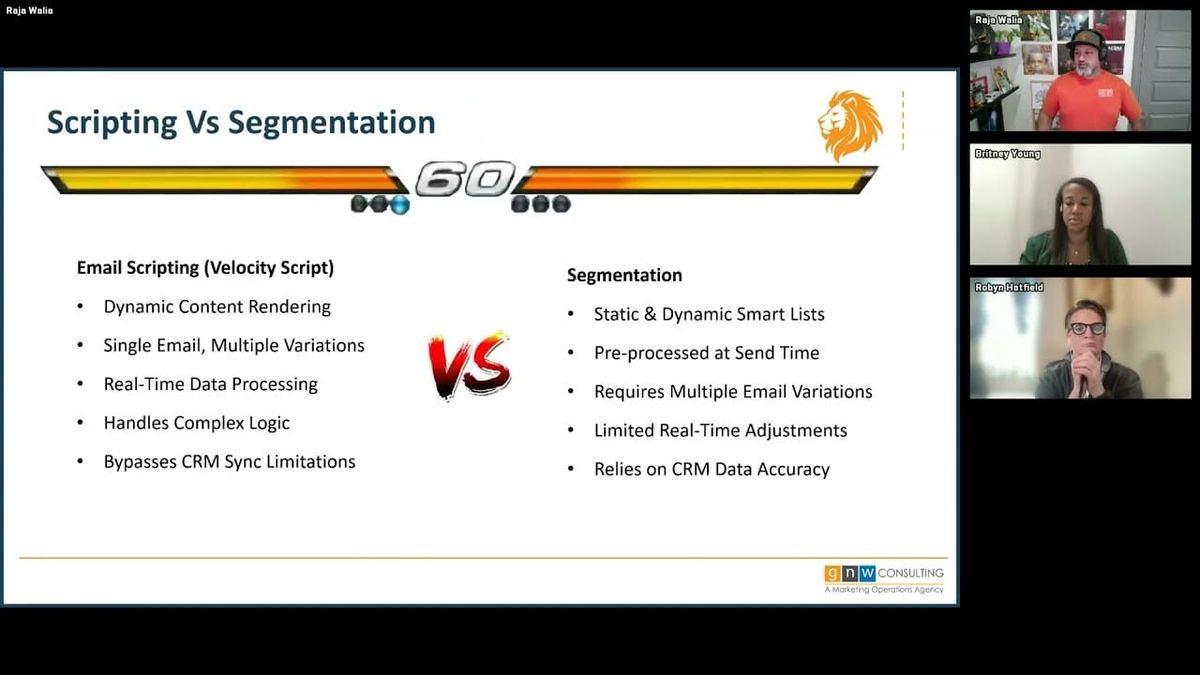
The broader pattern here is that velocity scripting functions as real-time conditional logic at send time, distinct from segmentation's pre-processing model. Because it evaluates field data at the moment of send rather than during a segmentation cycle, it handles edge cases — GUID fields, multi-select picklists, lookup fields with alphanumeric IDs — that segmentation handles poorly or requires flattening workflows to address.
"Every single script that you've seen here — even the ones inside the Marketo instance — this is the exact prompt I use. It solves probably 80 to 90% of scripting that you probably never used before. The only thing you really need to do: don't forget to check the field in the email script token editor. That is the most common reason items don't render the way they're supposed to."
Velocity Scripting as a Complement to Segmentation: When and Why to Reach for It
A presenter laid out the core conceptual case for email velocity scripting as a distinct tool from segmentation, focusing on the categories of data problems it solves better. The key differentiator is that velocity scripting evaluates logic at send time against live field data, whereas segmentation requires pre-processed, high-quality data and introduces preprocessing overhead. For fields that are structurally difficult to use in segmentation — lookup fields that appear in Marketo as alphanumeric GUIDs, multi-select picklists, numeric fields requiring conditional thresholds, or compound conditions combining multiple fields — scripting avoids the need to flatten data or build nested smart list logic.
Several specific use cases were outlined. Lookup and GUID fields are a recurring pain point: the common workaround is to create a flattened text copy of the field, but a velocity script can resolve the GUID value directly and render it in a human-readable format without that extra field. For multi-select picklists, scripting can evaluate multiple values simultaneously and render message variations based on combinations, removing the need for multi-condition smart lists. Numeric fields like revenue or contract values can be cast to numbers within the script to drive conditional CTAs. Program-level fields — for example, tracking which sessions a registrant has already joined — can be read into a script to promote only the relevant remaining sessions within a single email.
The framing throughout was that velocity scripting is not a replacement for segmentation but a complement for specific scenarios: where data is structurally awkward, where multiple email variations would otherwise be required, or where real-time field evaluation matters more than pre-segmented cohorts.
"If there's ever a time you ask yourself, there's got to be a better way to do this instead of right-clicking and cloning, or creating a segment within a segment within an email — this is probably what you're looking for."
Guardrails for Velocity Scripting: Testing Behavior, Template Risks, and Where Segmentation Still Wins
Q&A from the session surfaced several practical guardrails that don't appear in introductory coverage of velocity scripting. On testing: scripts do render in the email preview using live record data, which makes preview a valid first-pass test. However, a practitioner recommended always following up with a send sample, noting that one underappreciated risk is content overflow — if a script renders more content than a template's layout accommodates, it can break the template visually. This is distinct from a data correctness problem; the script may evaluate correctly while the presentation breaks.
On template integration, a notable limitation was raised: you cannot embed a token inside a script token. If the intent is to make a tracking pixel or other template-level element dynamic using a my-token-wrapped script, that pattern doesn't work — the nesting isn't supported. For elements like tracking pixels that don't need to change dynamically per record, a standard text approach is preferable. This is a constraint worth knowing before attempting to overload scripts with responsibilities they can't fulfill.
The localization question drew a clear-eyed answer: for full-language email variations, segmentation is generally the better tool. When entire email bodies differ by language, maintaining that logic inside a single script's if-then structure becomes unwieldy. Scripting is better suited to varying specific portions of an email — a CTA, a content block, a dynamically resolved field value — not replacing entire email bodies. The recommendation was to reserve segmentation for language variants and use scripting for the targeted, field-driven personalization within those variants.
"Anytime marketers are presented with something cool they want to use it everywhere and anywhere — but this is just for those specific examples. You have a GUID, you don't have a flat field, you want to put an actual digestible data format into it. That's probably the number one use case. Segmentation is already there from a language perspective, and it's sometimes a lot easier to just go in and create a different segment for a language email."
Also mentioned in this video
- The conceptual case for Marketo email velocity scripting, explaining how it… (4:57)
- The modern-day benefits of velocity scripting—easier with ChatGPT, fixes blank… (22:00)
- Audience Q&A covers testing velocity scripts via preview vs. send sample, which… (25:06)
Summarised from Adobe Marketo Engage User Groups · 32:08. All credit belongs to the original creators. Streamed.News summarises publicly available video content.