Original source: Adobe Marketo Engage User Groups
This article is an editorial summary and interpretation of that content. The ideas belong to the original authors; the selection and writing are by Marketo Ops Radar.
This video from Adobe Marketo Engage User Groups covered a lot of ground. 4 segments stood out as worth your time. Everything below links directly to the timestamp in the original video.
If you've accepted unexplained sync gaps as a cost of doing business with Dynamics, several of these root causes are addressable today without waiting on product fixes. Understanding which failures are silent — and why — changes how you triage.
Five Root Causes of Marketo-Dynamics Sync Failures — and What You Can Actually Fix
A practitioner presented a structured breakdown of the five most impactful causes of silent and overt sync failures between Marketo and Microsoft Dynamics. The most counterintuitive finding: Dynamics duplicate detection rules block not just record creation but also field updates on existing records — meaning a score change on a known lead can fail silently with no error generated, because Dynamics is technically behaving as configured. The recommended fix is to disable duplicate detection rules for leads and contacts entirely and rely on Marketo's native deduplication instead.
Two additional root causes center on data integrity at the field level. Deserialization errors occur when a value passed to a Dynamics picklist field doesn't match an accepted option — a risk amplified when campaign managers have edit access to forms and can inadvertently alter field values that Dynamics will reject. Restricting form editing to a core admin group eliminates this vector. Separately, mapping the 'Modified By' system fields in Dynamics creates a high-volume pull scenario: because that field updates whenever any of hundreds of fields changes, Marketo attempts to re-sync enormous volumes of records, producing multi-hour backlogs rather than outright failures.
The remaining two causes are harder to remediate. A schema name case sensitivity mismatch between Dynamics and Marketo produces a unidirectional sync break — data flows from Dynamics to Marketo but not back — and resolving it requires a schema rename in Dynamics with full downstream impact assessment. The fifth issue is an unresolved bug: Marketo field values are intermittently reverted to their prior state by a Dynamics sync event, with no triggering workflow on the Dynamics side. A practitioner's hypothesis is that the reversion occurs when a field update in Marketo coincides with an active sync window, causing the outbound value to be overwritten by the stale inbound value. The occurrence rate appears low but cumulative, and no clean workaround exists for bidirectional fields.
"Duplicate detection settings do block creation of duplicates based on whatever rules you set up, but they also block updates of existing records — and this is where the problem lies. No error is going to be generated because Dynamics is doing exactly what it's designed to do."
Proactive Sync Monitoring: Alerts, Shared Keys, and Boolean Handshakes for Dynamics Integrations
Because native Dynamics and Marketo error logs surface issues only after the fact — and often without actionable error language — a practitioner outlined a set of operational patterns designed to catch sync failures before they compound. The central recommendation is building Marketo email alerts as a proactive monitoring layer, since the native logs function more as forensic tools than real-time indicators. One specific alert pattern tracks whether a lead Marketo instructed Dynamics to create actually appears within a defined window. A 12-hour threshold was recommended over shorter intervals to avoid false positives caused by legitimate sync delays — including multi-hour backlogs from system updates or weekend maintenance — rather than true failures.
A second pattern uses a Boolean field as a handshake mechanism for cross-system workflow confirmation. When Marketo triggers a Dynamics workflow indirectly via a Boolean field, the confirmation that the workflow completed is Dynamics resetting that Boolean to false. Monitoring for cases where that reset doesn't occur within an expected timeframe provides an early warning signal for workflow or sync breakdown. Both patterns require tuning to the specific latency profile of a given instance.
For cross-system data reconciliation, a practitioner recommended creating a Marketo ID field in Dynamics — populated via smart campaign on lead creation using the Marketo lead ID token — to establish a shared unique key across both systems. This key enables reliable record-level comparison when auditing sync fidelity, since email address is unreliable as a join key due to duplicates and data quality issues, and Marketo's system-generated ID is not exported in standard CSV extracts.
"The best tool we have with the native sync is the alerts functionality to tip you off when something is not right. The error logs just are not helpful — they may be instructive once a problem is found, but they're never going to flag an issue for you."
Lead-to-Contact Merge Lifecycle Breaks, GUID Lookup Fields, and Field Sync Edge Cases in Marketo-Dynamics
A Q&A session surfaced three practical edge cases that extend the discussion of Marketo-Dynamics sync complexity. The lead-to-contact qualification merge behavior is a recurring pain point for lifecycle tracking: when a Dynamics lead is qualified and merged into a contact, the contact record wins — potentially overwriting source attribution fields and triggering duplicate lifecycle status updates that corrupt progression reporting. One practitioner described maintaining backup versions of score and lifecycle status fields specifically to enable post-merge restoration via batch campaign, framing it as an unavoidable workaround given that the merge timing relative to the sync cycle appears to influence which behavior is observed.
A long-standing unresolved issue was also raised: Dynamics lookup fields sync to Marketo as GUIDs rather than human-readable values. This has been an acknowledged gap for years without a native resolution. Two middleware and orchestration platforms were mentioned as practical workarounds — one as a connector that handles the translation layer, and another that recently released a native Dynamics connector as part of its ABX platform, which practitioners noted may enable lookup field values to be resolved and passed back to Marketo. These are not native solutions, but they represent the current state of the art for teams where the GUID issue is operationally blocking.
A third question about custom Dynamics fields not saving in the Marketo field sync UI received a thin but useful answer: the behavior is occasionally a timing issue that resolves on its own within a few hours, but if it persists, support intervention can trigger a manual sync pull that resolves it.
"You've got to figure out which fields matter to you and have backup versions of them that you can restore after the merge takes place."
Where Marketo's Native Dynamics Sync Still Falls Short: Feature Gaps and What's Being Tested
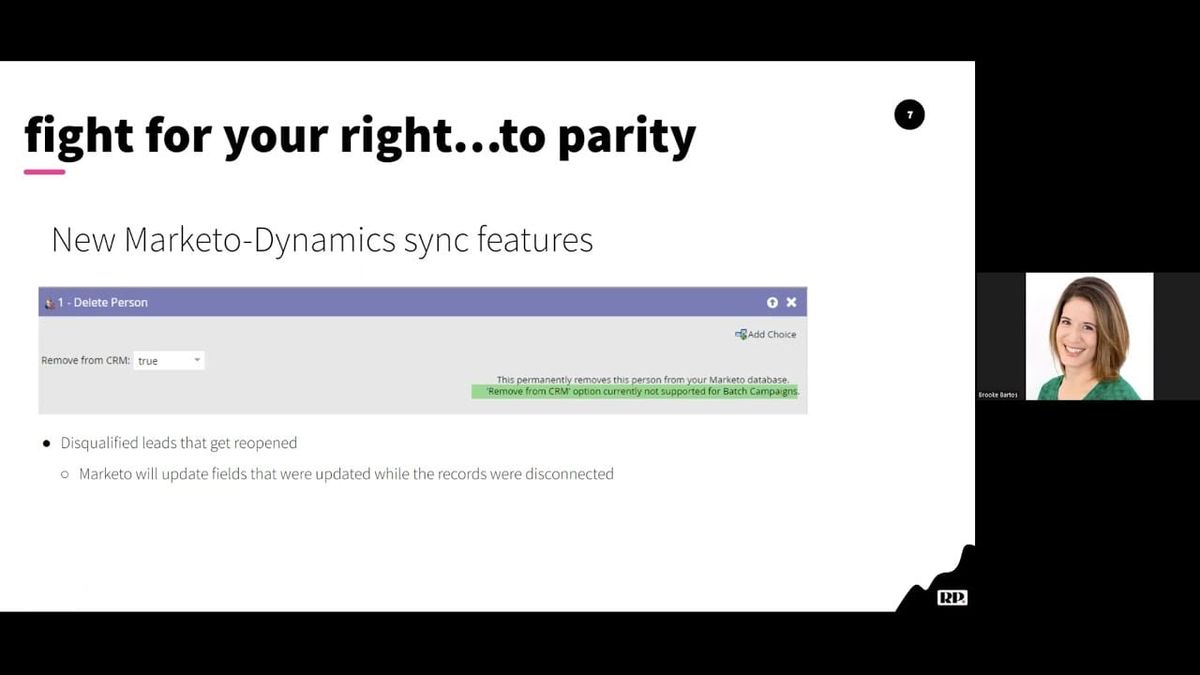
A practitioner provided a frank assessment of recently released Marketo native sync features for Dynamics users, alongside a broader accounting of where the integration continues to lag behind Salesforce parity. Three features — deleting records from Dynamics via Marketo, re-linking disqualified leads so field updates resume syncing, and creating tasks via smart campaigns — were presented as either newly available or previously introduced, but testing in a sandbox environment failed to produce successful results in at least two of the three cases. The task creation capability, introduced to Dynamics users in 2021, remains restricted to triggered campaigns only with no batch support, a gap that has persisted through multiple release cycles.
A Sales Insight UI update that represents a significant functional enhancement for sales reps — not merely cosmetic — was noted as having been available to Salesforce users for approximately three years with no equivalent release for Dynamics users. The practitioner framed this disparity not as neglect but as a structural consequence of the two CRM vendors' differing product philosophies and developer ecosystems, noting that the Marketo-Dynamics relationship has improved over time but remains incomplete.
The segment functions partly as a call for crowdsourced testing: because sandbox results were inconclusive, the practitioner explicitly asked other Dynamics users to test the newly released features in their own instances and share findings. The underlying message is that Dynamics users represent the second-largest Marketo user base and that sustained, specific feature requests from practitioners carry weight in prioritization.
"The more of us that are asking for these specific gaps to be filled, the more likely we are to get these prioritized and into the product that we use on a day-to-day basis."
Also mentioned in this video
- The maturity curve framework for Marketo-Dynamics environments, introduces… (17:44)
- The higher maturity levels achievable once sync trust is established, including… (44:47)
Summarised from Adobe Marketo Engage User Groups · 59:40. All credit belongs to the original creators. Streamed.News summarises publicly available video content.