🌐 Also available in: 🇩🇪 Deutsch
Original source: Adobe Marketo Engage User Groups
This article is an editorial summary and interpretation of that content. The ideas belong to the original authors; the selection and writing are by Marketo Ops Radar.
This video from Adobe Marketo Engage User Groups covered a lot of ground. Marketo Ops Radar selected 6 key moments and summarises them here. Everything below links directly to the timestamp in the original video.
If you're accustomed to the limitations of snippets, understanding the new flexibility of fragments is key to modernizing your content strategy. This feature strikes a better balance between brand consistency and campaign-specific adjustments.
Understand How Fragments Surpass Snippets in the New Email Designer
A presenter explained that while fragments in the new email designer serve a similar purpose to snippets in Email 2.0, they offer significant upgrades for content reusability. Fragments are managed via a drag-and-drop interface and, most importantly, provide granular control over whether the content can be modified at the individual email level.
This new layer of control allows a marketer to make local changes to a fragment's content within an email. The system automatically creates a separate copy, preventing any impact on the original fragment or other emails that use it, offering a level of flexibility absent with traditional snippets.
"During updation of the fragment at the email level, it automatically creates a separate copy so that it will not impact the existing fragments."
Enforce Brand Consistency with Theme-Based Styling in the New Email Designer
A speaker demonstrated how the new email designer's "Themes" feature centralizes brand styling to ensure consistency across all communications. Teams can predefine foundational brand elements including color palettes, font sizes for headings, button styles, padding, and borders, creating reusable packages for different brands or campaigns.
Critically, themes can only be created at the template level, not the individual email level, which enforces a governance-first approach. Once a theme is applied, all new content modules automatically default to the correct brand standards, speeding up creation and reducing errors.
"Instead of defining the font sizes everything each and every time, now we can create our own theme and reuse it multiple times in the emails."
Implement Granular Governance with Content Locking in Email Templates
The new email designer introduces a content locking feature to prevent unintended edits to standard email sections like headers and footers. A speaker explained that this governance control must first be enabled at the main body level of an email template. Once active, administrators can set specific locking rules for individual components within that template.
The system offers three distinct levels of control: a full lock preventing any edits, a partial lock allowing content updates while keeping styling fixed, and a fully unlocked state. This provides granular control to balance brand consistency with marketers' need for customization.
"An administrator can decide which content a marketer can edit and which they can't at the email level."
Choose Between Predictive and Dynamic Content Based on Audience and Scale
A presenter clarified the key differences between predictive and dynamic content. Dynamic content is a manual, rule-based system requiring practitioners to build segments and define variations. It performs best for known audiences where personalization is based on clear attributes like job title or country.
In contrast, predictive content uses AI to automatically personalize based on observed user behavior, making it effective for both known and anonymous visitors. This approach is better suited for large product catalogs or high-volume user bases where manual segmentation and rule creation are impractical to scale.
"Dynamic content works well for known users... but predictive content works well for both known and anonymous users."
Streamline Email Reviews with the In-App Commenting Feature
A practitioner shared how the new email designer's commenting feature can solve common review cycle bottlenecks for large teams. Functioning much like the comment system in a word processor, it allows stakeholders to add, reply to, and resolve feedback directly on specific blocks within an email draft.
This collaborative feature is available at the individual email level, not on templates, positioning it as a tool for campaign-specific reviews. It helps centralize feedback and reduce the risk of comments getting lost in external project management tools, spreadsheets, or lengthy email threads.
"This is similar to the word doc feature, how we do comments... and after that we can resolve and reply to the comment."
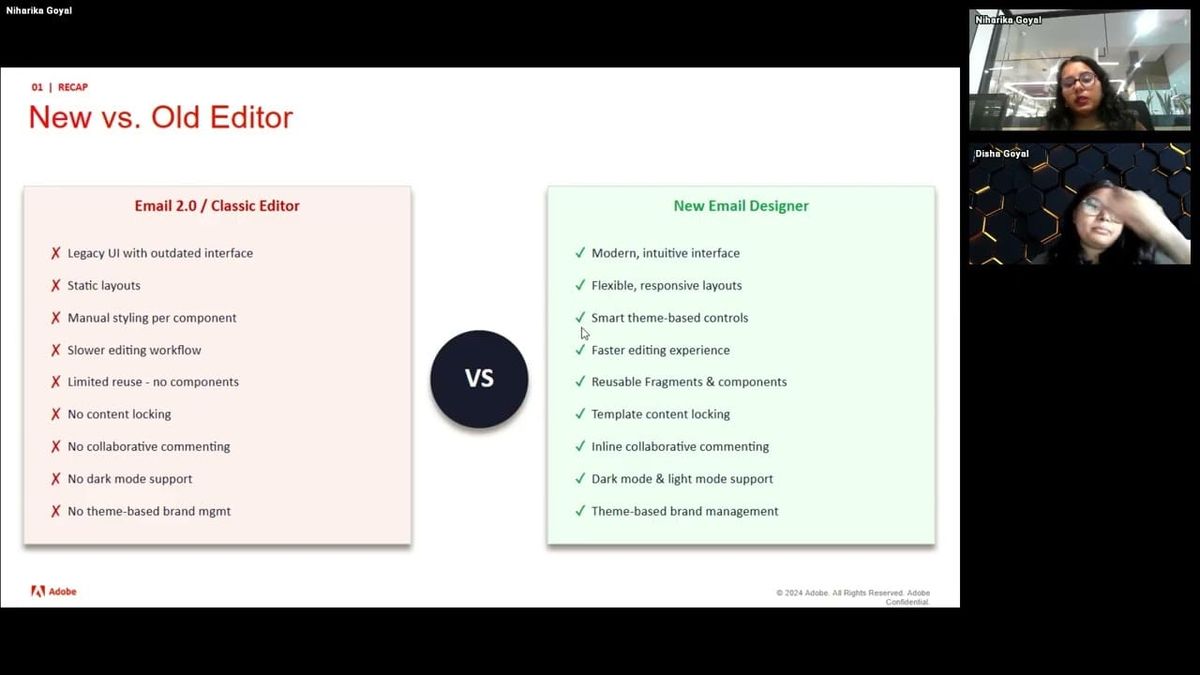
A Practical Guide: When to Use the New Email Designer vs. Email 2.0
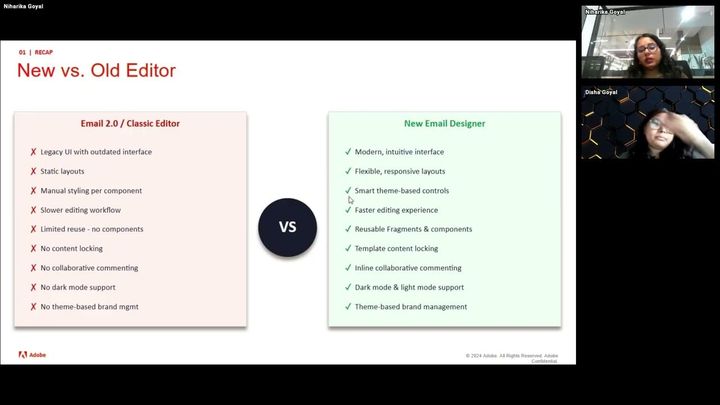
A speaker provided a comparative guide to help teams decide between the classic Email 2.0 editor and the new email designer. The classic editor remains a strong choice for developers working on highly complex, custom-coded structures that require deep control. The new designer excels for teams that prioritize drag-and-drop simplicity and wish to reduce their reliance on developer resources.
Key features exclusive to the new designer include content locking, reusable fragments (an advanced version of snippets), theme-based styling, and built-in commenting. One practical recommendation was to begin migrating with simple emails to test the new workflow before tackling more complex layouts.
"If I have to create a complex structure, I think in that case email 2.0 is better. But if you don't want to spend money on the developer end and you have to create a simple structured email, that will go with a new email designer."
Also mentioned in this video
- Niharika begins discussing the new Marketo email designer, highlighting its… (8:18)
- Niharika demonstrates the new 'Import HTML' feature in the Marketo email… (10:31)
- Predictive content as an AI-powered personalization feature in Marketo that… (30:26)
- The four-step process of how predictive content works, involving Marketo… (35:58)
- Disha demonstrates how dynamic buttons work in the new email designer, showing… (41:47)
- Marketers cannot manually instruct AI on specific content criteria for… (43:54)
- Is raised about using a manually styled fragment within a theme-based email and… (44:56)
Summarised from Adobe Marketo Engage User Groups · 46:45. All credit belongs to the original creators. Marketo Ops Radar summarises publicly available video content.