Original source: Adobe Marketo Engage User Groups
This article is an editorial summary and interpretation of that content. The ideas belong to the original authors; the selection and writing are by Marketo Ops Radar.
This video from Adobe Marketo Engage User Groups covered a lot of ground. 4 segments stood out as worth your time. Everything below links directly to the timestamp in the original video.
If your team still exports to Excel to recalculate scores or reformat field values before re-uploading, this flow step pattern removes that entire loop from your process. The round-robin and weighted composite score patterns alone are worth the 30-minute setup.
A Formula Flow Step Pattern That Eliminates Excel-Based Data Calculations in Marketo
A practitioner demonstrated how a community-provided compute formula flow step — deployable via Adobe IO in roughly 30 minutes with no coding required — can replace the longstanding workaround of exporting data to Excel, calculating values, and re-importing lists. The step uses the formulaJS library, which closely mirrors Excel function syntax, and can return either a string or numeric value to any Marketo field. Once installed, it surfaces as a native smart campaign action alongside standard flow steps.
The use cases presented ranged from straightforward to architecturally significant. On the straightforward end: text capitalization, partial email masking for preference centers, domain extraction from email addresses, and lead record completeness scoring. More strategically, the step enables top-interest identification across multiple behavioral score fields, weighted composite score recalculation without altering the underlying scoring model, round-robin lead assignment using the MOD function against sequential lead IDs, country code lookup via a LOOKUP formula, and per-lead click-through rate calculation from existing score fields.
A practical workflow tip shared in the session: prompt an AI assistant with your data structure and desired outcome, specifying the formulaJS library as the context. This significantly accelerates formula development — though practitioners were cautioned to validate AI-generated formulas against the formulaJS site before deploying, as AI tools occasionally fabricate function names that don't exist in the library.
"Over the past 16 years, I've often wished that Marketo had a formula flow action or the ability to calculate formulas. I have many times had to export data and do calculations in Excel and reimport lists — and I'm very happy not to have to do any of that anymore."
Self-Service Flow Steps vs. Webhooks: A Structural Comparison for Marketo Practitioners
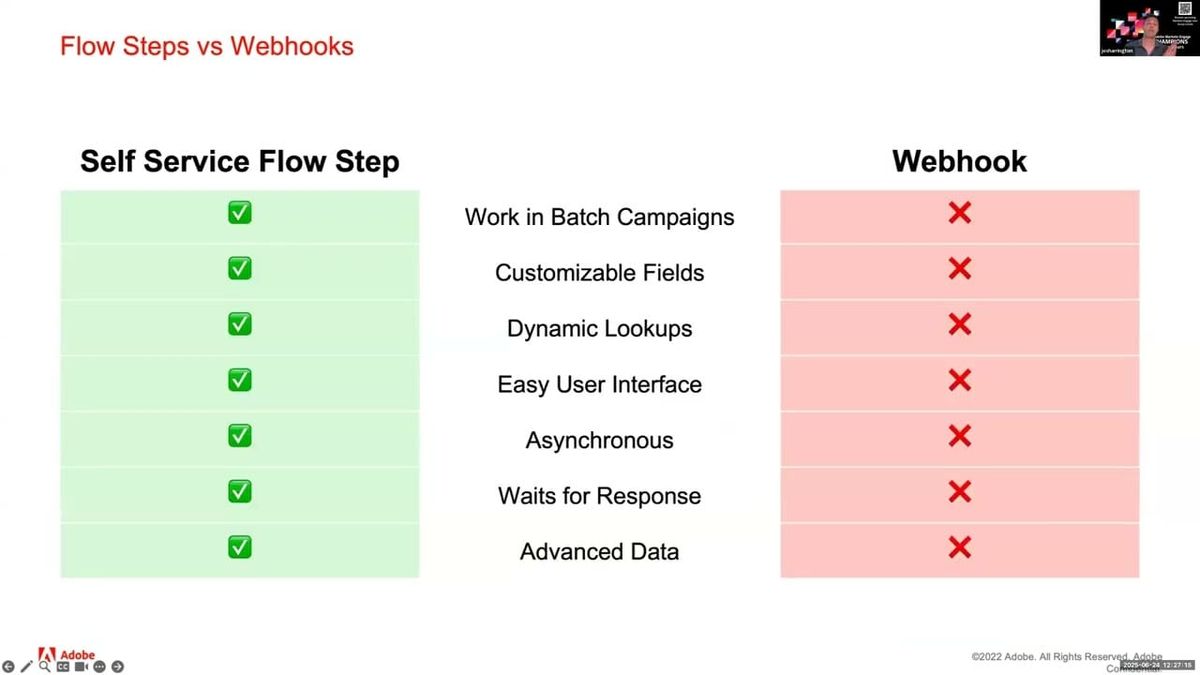
A presenter laid out a detailed architectural comparison between webhooks and self-service flow steps, moving beyond surface-level differences to highlight the failure modes that make webhooks problematic at scale. The core distinction: webhooks fire individual requests simultaneously with a hard 30-second response window, meaning a batch of 10,000 leads generates 10,000 concurrent requests — a pattern that causes timeout errors and leaves Marketo with no reliable record of whether the action succeeded. Self-service flow steps instead process records in batches of 1,000, pass a return URL, and wait indefinitely for a response before continuing the flow.
Beyond batching, three additional architectural advantages were highlighted. First, flow steps wait for a response before proceeding to the next action in the flow — a critical difference when downstream steps (such as sending a personalized email) depend on data retrieved by the flow step. With a webhook, the email sends before the data returns, producing empty or incomplete output. Second, flow steps generate their own custom activity records, which can be used as triggers and filters in smart campaigns — enabling conditional logic based on action outcomes without writing results to a lead field. Third, flow steps support dynamic dropdowns that pull live data from a back-end service, updating automatically on a default 24-hour cycle or on demand.
The framing throughout positioned these differences not as incremental improvements but as eliminating entire categories of workarounds that Marketo practitioners have historically built around webhook limitations.
"A timeout error does not mean that the SMS wasn't sent. It just means that Marketo doesn't know what happened."
How Self-Service Flow Steps Handle API Rate Limits — and What Adobe IO Access Actually Costs
A Q&A exchange surfaced a practically important architectural pattern for teams whose third-party APIs enforce rate limits. Rather than hitting an external API directly from Marketo, a middleware service can sit between the flow step and the destination API, throttling outbound requests to stay within rate limits and implementing retry logic when limits are exceeded. Because self-service flow steps have no response time limit, the middleware can pace requests as slowly as needed and still pass results back to Marketo once the full batch completes — a structural advantage that webhooks cannot replicate given their 30-second timeout.
On the cost question, a practitioner clarified that self-service flow steps themselves carry no additional licensing cost — the capability is included in Marketo Engage. The hosting question is separate: Adobe IO may be included for Marketo Engage customers, though practitioners were advised to confirm this with their Adobe representative rather than treat it as guaranteed. Hosting on third-party cloud infrastructure (Azure, AWS, Google Cloud) would incur costs, though a serverless architecture keeps those costs minimal except at very high request volumes.
The exchange highlighted a common blind spot: teams evaluating this capability may conflate the feature cost (none) with the infrastructure cost (variable), which are independent decisions.
"There's no time limit. So it can throttle, take as long as it wants, go slowly — and when all the responses are received for that batch of a thousand, then it can pass them back to Marketo."
Expanding Marketo's Native Capabilities: A Breadth Survey of Self-Service Flow Step Use Cases
A presenter surveyed the range of operational gaps that self-service flow steps can address, grouping them into categories that reflect longstanding limitations in native Marketo functionality. The use cases covered include generative AI integration (passing prompts and receiving responses for lead scoring, content personalization, or sentiment analysis), deduplication triggered directly from smart campaigns, and custom object management — create, update, and delete actions — which have no native flow step equivalents. Each of these represents a capability that previously required either a webhook workaround, an external tool, or manual intervention.
Additional use cases addressed data connectivity: lead enrichment via third-party data providers (accessed through a flow step rather than each provider's separate interface), external database sync with finer control over when and how data moves, and expanded CRM actions beyond what native integrations support — including opportunity and account-level operations. Alert routing was also covered, with flow steps enabling messages to collaboration platforms like Slack or Teams, and the option to make those alerts interactive to support approval workflows.
The session treated these as illustrative rather than exhaustive, with the underlying pattern being that any action requiring an API call to an external system is now a candidate for a purpose-built flow step rather than a generic webhook.
"Self-service flow steps don't use API calls at all."
Also mentioned in this video
Summarised from Adobe Marketo Engage User Groups · 31:11. All credit belongs to the original creators. Streamed.News summarises publicly available video content.