🌐 Also available in: 🇩🇪 Deutsch
Original source: Adobe Marketo Engage User Groups
This article is an editorial summary and interpretation of that content. The ideas belong to the original authors; the selection and writing are by Marketo Ops Radar.
This video from Adobe Marketo Engage User Groups covered a lot of ground. Marketo Ops Radar selected 6 key moments and summarises them here. Everything below links directly to the timestamp in the original video.
If your team spends too much time on repetitive program setup or data entry, consider building a custom front-end. This can streamline workflows and reduce the risk of user error.
Build Custom UIs to Standardize and Simplify Marketo Operations
A practitioner demonstrated a custom application that connects to a Marketo sandbox via an MCP (Model Context Protocol) server. This tool simplifies common tasks like cloning programs from templates, automatically enforcing naming conventions, and creating or deleting leads using natural language prompts without needing explicit field mapping.
This approach abstracts complex or repetitive API interactions into a user-friendly interface, reducing manual errors and empowering team members to perform administrative tasks safely and efficiently.
"You notice that I didn't need to say 'first name equals X, last name equals Y'... it just understands. This is what sets agents apart."
Use Smart Campaign Logic to Simulate Multi-Variant Journey Tests
A presenter outlined a strategy for testing entire workflows or "action paths" by using smart campaign flow steps to split an audience. This method allows for testing complex hypotheses, such as comparing different nurture cadences, messaging styles, or SDR follow-up triggers for separate cohorts.
By creatively structuring flow steps and using smart reporting, you can effectively trick Marketo into performing multi-variant tests that go far beyond a simple email A/B test.
"You can trick Marketo into thinking it has multivariant testing. And if you're clever with your reporting, you can get that all into one report."
▶ Watch this segment — 1:04:05
Establish Global, Persistent Testing Cohorts for Consistent Measurement
One speaker advocated for automatically assigning every new or qualified lead to a persistent global testing group (e.g., Control, A, B). This assignment, stored in a custom field or managed via static lists, ensures that an individual remains in the same cohort across all campaigns, preventing testing contamination.
This approach simplifies the setup of individual tests and provides a more reliable foundation for measuring the cumulative impact of marketing efforts on a truly randomized sample over time.
"The perfect way to destroy your testing methodology completely is for someone to cherry-pick into the cohorts."
▶ Watch this segment — 1:08:45
Prioritize Security and Granular Permissions for MCP Servers
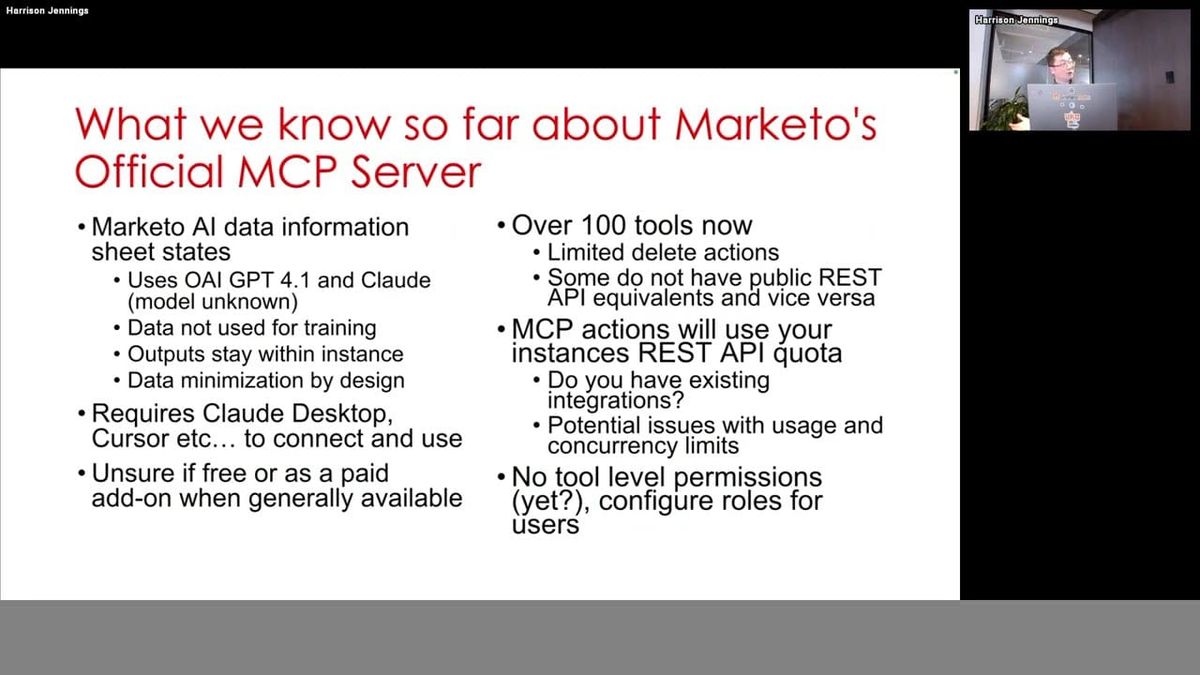
A presenter highlighted critical security considerations for using MCP (Model Context Protocol) servers, especially those from third parties. The key warning was to treat third-party servers like browser extensions—don't install anything you don't trust, and verify the tools and their functions to avoid potential malicious activity or data exposure.
Instead of granting broad API access, practitioners should invest time in configuring granular, role-based permissions that provide only the necessary access for a specific integration.
"You wouldn't install something you don't trust. It's very important that you verify what the tools on that MCP server do because there could be malicious tools."
Build a Custom MCP Server to Enforce Business Logic and Control API Usage
A speaker proposed building a custom MCP (Model Context Protocol) server as a way to gain more control over AI-driven interactions with Marketo. By creating a private server, a team can embed its specific business logic—such as program naming conventions—directly into the available tools, preventing AI hallucinations or user errors.
This approach also allows for creating high-order, company-specific tasks (e.g., "run quarterly executive report") and controlling API throughput to prevent runaway requests from impacting performance.
"If your business logic is embedded in the MCP server inside the tools, agents can't hallucinate, can't get around that. It's hardcoded into the API request."
Advanced Tactics and Common Pitfalls for Email Program A/B Tests
A speaker shared advanced techniques for the standard email program A/B test, alongside critical limitations. Useful but less common tactics include running a 50/50 split with no winner declared, or using "custom conversion" as the success criteria to measure a specific action rather than just clicks or opens.
However, practitioners were warned of several "gotchas": A/B tests are incompatible with "send in recipient time zone," and the custom conversion feature frustratingly cannot target a specific link click within an email test.
"It is actually impossible within an AB test in Marketo to go 'which link did they click' as the customer conversion? I just can't get over it and they've never changed it."
Also mentioned in this video
- APIs are like schemas for server communication, emphasizing their power and how… (3:38)
- Jay uses a restaurant analogy to illustrate the process of making an API call,… (5:27)
- MCP (Model Context Protocol) as an alternative to APIs that standardizes agent… (6:25)
- A typical MCP (Model Context Protocol) flow, showing how a tool is described… (8:10)
- The MCP (Model Context Protocol) agent's reasoning capabilities, contrasting it… (9:27)
- Marketo's official MCP (Model Context Protocol) server, highlighting that the… (10:33)
- Jay details key aspects of the Marketo MCP (Model Context Protocol) server,… (11:44)
- A critical governance issue with the MCP (Model Context Protocol) server is the… (13:57)
- When to use agents and MCPs, highlighting that they provide API-level access to… (14:41)
- Ideal use cases for agents and MCPs, including thinking and reasoning tasks,… (16:06)
- Limitations such as audit trails being tied to the API user, AI's inability to… (17:22)
- Jay suggests that for tasks taking less than a minute, it might be quicker to… (18:28)
- Privacy considerations for MCP (Model Context Protocol) servers, including… (21:14)
- The future of MCPs (Model Context Protocols) and MOPS, noting that the near… (22:32)
- MOPS professionals need to evolve from platform operators to orchestrators by… (23:55)
- His 'central ops' or 'admin center' built with Retool Builder, which acts as a… (25:47)
- An MCP (Model Context Protocol) server's performance depends on whether it has… (33:00)
- Jay confirms that it is technically possible to build an MCP (Model Context… (34:48)
- Folders. (36:12)
- The Marketo programs API currently lacks wildcard search capabilities, limiting… (37:12)
- Good processes, naming conventions, and clean data in Marketo can help agents,… (37:50)
- Jay clarifies that MCP (Model Context Protocol) is unrelated to Velocity… (40:46)
- While APIs can access email asset names or program tags, scanning the actual… (41:25)
- The importance of A/B testing and using evidence over intuition in marketing,… (44:15)
- V asserts that testing is a methodical, scientific, and agile process of… (46:00)
- Her presentation's focus on showcasing everyday Marketo tools for A/B testing,… (47:05)
- Critical rules for A/B testing in Marketo (48:23)
- Control groups as a 'do nothing' benchmark to test result validity, comparing… (50:01)
- 'Random Sample' as an old-school, highly flexible tool for global testing, such… (56:43)
- The underutilized 'Landing Page Test Groups' for 50/50 A/B testing of landing… (58:31)
- Champion/Challenger as a criminally underutilized A/B testing feature for… (1:02:58)
- The utility of Marketo's new feature allowing static lists in segmentation,… (1:12:07)
- V concludes by emphasizing that the biggest barrier to adopting an experimental… (1:12:54)
- Her experience with global control groups, noting that their performance (e.g.,… (1:15:20)
- Concerns about control groups not receiving emails, explaining that random… (1:17:35)
Summarised from Adobe Marketo Engage User Groups · 1:23:17. All credit belongs to the original creators. Marketo Ops Radar summarises publicly available video content.