🌐 Also available in: 🇩🇪 Deutsch
Original source: Adobe Marketo Engage User Groups
This article is an editorial summary and interpretation of that content. The ideas belong to the original authors; the selection and writing are by Marketo Ops Radar.
This video from Adobe Marketo Engage User Groups covered a lot of ground. Marketo Ops Radar selected 6 key moments and summarises them here. Everything below links directly to the timestamp in the original video.
If you're wondering where to begin with AI in your instance, this tactical advice provides two clear starting points. See how automating common MOPs tasks can unlock capacity for more strategic work.
Prioritize Low-Hanging Fruit for Initial AI Wins in Marketing Operations
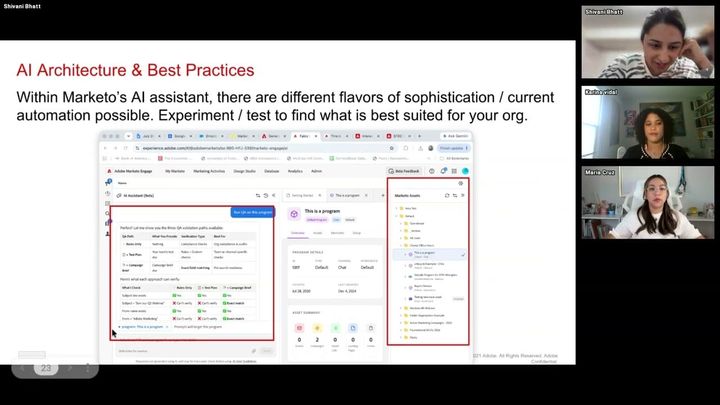
A presenter recommended starting an AI journey by targeting high-impact, low-effort tasks. Out-of-the-box AI assistant skills like "validate programs" and "import leads" were highlighted as ideal starting points for immediate time savings. These tasks are often manual, time-consuming, and can be automated to quickly demonstrate value.
By automating these foundational operational tasks, practitioners can free up significant weekly hours. This reclaimed time can then be reallocated to more strategic, high-value projects like lead scoring audits, database health initiatives, or developing specialized ABM strategies.
"I would recommend first start with validating programs. That's where you're going to see a lot of the time get sucked into."
Frame AI Adoption Around Use Cases, Not Features, to Maximize Impact
A presenter advocated for an AI playbook approach that prioritizes solving specific business problems over simply activating new features. This use-case-driven strategy focuses on how AI can optimize processes, fix issues, and deliver measurable results. One practitioner shared an example of saving over $18,000 and reducing a four-month project to three weeks by leveraging an in-house tool to solve a clear operational need.
Focusing on the problem to be solved makes it easier to quantify the return on investment in terms of cost savings, hours reclaimed, or revenue influenced. This reframing helps secure buy-in and demonstrates the strategic value of marketing operations.
"Enter this with the use case in terms of how you can fix an issue or solve a problem or just optimize a process rather than thinking about how you can activate a feature."
Use a Prioritization Matrix to Strategically Scale AI Initiatives
A presenter introduced a prioritization matrix to help teams strategically identify where to apply AI. The framework involves scoring organizational pain points (based on severity and frequency) and potential solutions (based on feasibility and risk mitigation). Multiplying these scores creates a clear visual distinction, helping to surface quick wins and major strategic initiatives.
This quantitative approach moves AI planning beyond intuition, allowing teams to objectively identify the most impactful and achievable projects. It provides a defensible roadmap for scaling AI adoption based on concrete organizational needs.
"It's really going to put in perspective what are the things or key initiatives that you can focus on. And this is based off the higher the number, the higher the point is going to to be."
Establish Guardrails and Training Protocols for Consistent GenAI Output
To ensure consistent and on-brand GenAI output, a speaker recommended establishing clear guardrails. This involves consistently using brand guidelines as a reference document for all prompts to maintain the correct tone and voice. A shared, living prompt document was also suggested to help standardize inputs across the team and ensure consistency, regardless of who is generating the copy.
Actively using feedback mechanisms, like thumbs-up/down ratings, is crucial for training the AI model over time. This continuous feedback loop helps the system learn your preferences and improves the quality of future outputs.
"You should always consistently have the brand guideline because that ensures that it's listening for the tone and the voice of the organization to personify at it best the copy that is being generated."
Manage Source Tracking for AI-Powered List Imports
A practitioner raised a common issue where using the AI list import agent sets the "Original Source Type" to "Web Service API," which can interfere with growth reporting. This happens because the agent technically uses an API to add records. The recommended solution is to rely on a separate, custom "Person Source" field for more granular and accurate marketing attribution.
To automate this, operational programs can be used to populate the custom "Person Source" field based on data points like UTM parameters or unique keywords associated with the import list. This ensures source data remains clean and useful for reporting.
"My recommendation would be if you have a separate person source. Usually the person's source is leveraged in addition to the original source type because it lets us know if someone actually came from a webinar or an event."
Set Up and Deploy AI-Powered Predictive Content in Emails
A presenter provided a tactical guide for setting up AI predictive content within emails. The process involves adding content assets with URLs, titles, and descriptive categories, then explicitly approving them for use. Using categories is highly recommended as it helps the AI engine select the most relevant asset for each individual based on their engagement history.
Because content is selected at the moment an email is opened, it is critical to manage assets carefully. Deleting a content piece after an email has been sent can result in a broken image icon for recipients who open it later.
"These assets are actually selected for the user at the moment that they open the email. So unlike dynamic content where you can see what the segment is going to be receiving, this is very unique and is an on-time offer."
Also mentioned in this video
- Recording availability, then emphasizes that all covered GenAI features require… (1:33)
- The speaker demonstrates where AI features are located in Marketo Engage,… (5:10)
- The GenAI email designer as a robust feature for email production, highlighting… (16:16)
- The necessary guardrails for accessing the GenAI email designer, emphasizing… (17:39)
- Karina showcases the full production line capabilities of GenAI within the… (18:34)
- Karina details the GenAI copy feature, explaining how users can leverage… (19:18)
- Karina demonstrates how to access and use the email builder in Design Studio,… (21:13)
- QA for brand alignment, explaining how the AI can review entire emails against… (25:10)
- The image creation feature, explaining how users can create on-brand images by… (26:12)
- Karina details the process of creating branded GenAI images, emphasizing the… (27:00)
- To use these images, including sending them for design team approval or… (28:20)
- Two ways to embed emails created with the email designer into Marketo programs:… (29:05)
- The speaker quickly overviews GenAI in interactive webinars, noting its… (30:23)
- The implementation framework, recommending creating a specific GenAI role to… (34:37)
- An agent's actions appear on the person's ledger, suggesting a smart list to… (50:07)
Summarised from Adobe Marketo Engage User Groups · 53:55. All credit belongs to the original creators. Marketo Ops Radar summarises publicly available video content.